WARNING#
Patching over an important system function improperly can fully brick an instance. For instance, the global GlideRecord prototype is used by a number of critical system functions, so if you incorrectly patch it, you brick your instance until Rhino either restarts or crashes. You can’t restart a PDI on demand, so you are pretty much screwed (unless you figure out how to crash Rhino) and asking/waiting on ServiceNow to restart an dev instance because you randomly patched over a system function is a bad look.
Usage#
CodeSpy from the global scope, I recommend a global background script.CodeSpy allows you to profile server side scripts, capturing things like call trees, execution times and more. It’s a great way to identify bottlenecks and optimize your scripts.
The safest (and only way you should be using this tool), is to use the CodeSpy class, it’s a wrapper around the profiler that catches errors in the profiled code, so if anything goes wrong, it will clean up after itself. Otherwise you risk not cleaning up your spies, if you accidentally comment out a line of code, or forget to try/catch which is how you get into trouble.
CodeSpy.profileFunc() expects to be passed a function that contains the code you want to profile, this function should accept a single parameter for a instance of the ServerSideProfiler. You are in charge of setting up the function spies within the passed function and calling profiler.enable().
Enabling and Disabling#
To enable the profiler, you can call ServerSideProfiler.enable() and to disable it, you can call ServerSideProfiler.disable(). Don’t enable until you have setup your spies and done any setup. Using disable is optional CodeSpy will do it for you after executing the passed function.
Spying on Functions, Classes and Prototypes#
You can spy on a function by calling profiler.spyOnFunction(object, methodName). You can spy on all methods on an object or class by using profiler.spyOnAllFunctions(object).
Until the profiler is enabled, these spied on functions will call through and not be profiled. The original function is stored as a property of the spy object, and each spy object has a restore() method that allows us to restore the original function. You cannot spy on a function that is already being spied on.
Only javascript functions can be spied on, Java objects and non-functions cannot and will just fail silently.
To spy on a prototype, you simply use the object.prototype syntax to target the prototype you want to spy on. This means that any instances of the object will have the spy applied.
Example Usage#
var codeSpy = new CodeSpy();
  var sandboxFunc = function(profiler) {
    var testScript = new TestScriptInclude();

    //Setup spies on the Script Include and GlideRecord prototype
    profiler.spyOnAllFunctions(testScript);
    profiler.spyOnAllFunctions(GlideRecord.prototype);
    profiler.enable();

    //Do the actual work
    testScript.getAllIncidentAssigneesSlow();
    testScript.getAllIncidentAssigneesFast();
    testScript.getAllIncidentAssigneesGlacial();
  }

  //CodeSpy returns a ProfilerResults object
  var results = codeSpy.profileFunc(sandboxFunc);
  gs.info(results)
Getting the Results#
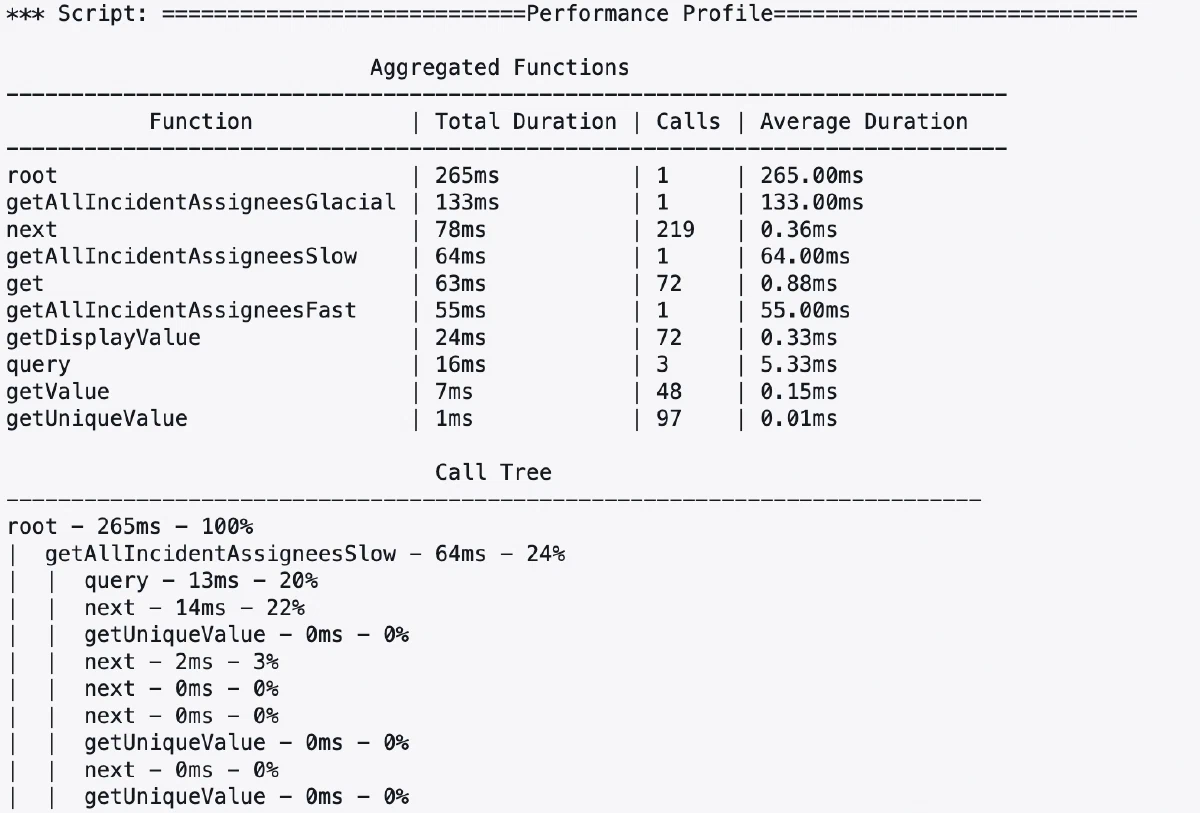
Once profiling is complete, you can get the results by just printing out the result object. The toString version of the results is a profile report, showing the call tree, execution times and more. There is also toJSONString to get a JSON object representing the raw call tree.
Example Output#
============================Performance Profile============================

                              Aggregated Functions
  -----------------------------------------------------------------------------
             Function            | Total Duration | Calls | Average Duration
  -----------------------------------------------------------------------------
  root                           | 265ms          | 1     | 265.00ms
  getAllIncidentAssigneesGlacial | 133ms          | 1     | 133.00ms
  next                           | 78ms           | 219   | 0.36ms
  getAllIncidentAssigneesSlow    | 64ms           | 1     | 64.00ms
  get                            | 63ms           | 72    | 0.88ms
  getAllIncidentAssigneesFast    | 55ms           | 1     | 55.00ms
  getDisplayValue                | 24ms           | 72    | 0.33ms
  query                          | 16ms           | 3     | 5.33ms
  getValue                       | 7ms            | 48    | 0.15ms
  getUniqueValue                 | 1ms            | 97    | 0.01ms

                                   Call Tree
  ---------------------------------------------------------------------------
  root - 265ms - 100%
  |  getAllIncidentAssigneesSlow - 64ms - 24%
  |  |  query - 13ms - 20%
  |  |  next - 14ms - 22%
  |  |  getUniqueValue - 0ms - 0%
  |  |  next - 2ms - 3%
  |  |  next - 0ms - 0%
  |  |  next - 0ms - 0%
  |  |  getUniqueValue - 0ms - 0
  cont..
Technical Details#
How does it work?#
Premature optimization causes more problems than it solves, but when it comes to optimize, being able to measure rather than just guessing where the bottlenecks are is a must. ServiceNow provides us GlideStopWatch that allows us to measure performance, but setting up logging statements and timing sections across a script is a huge pain.
I started by trying to build a wrapper around GlideStopWatch that would improve the experience of using it, but I quickly realized that I could take it a step further and build a full profiler.
The profiler functionality is based around how spies are implemented in testing tools like Jest. Essentially, we wrap any function we want to profile in a wrapper that times the execution and allows us to capture things like call trees, execution times and more. We can even spy on a prototype, so we can profile methods on objects before they are instantiated, without having to modify the original code.
Function Spies#
To apply a function spy, we essentially override the function with a new function, the new function still calls through to our existing function and returns the result. However it also does some additional leg work, logging start and end of the call, as well as any arguments passed in and returned.
sequenceDiagram
    participant Caller
    participant MonkeyPatch as Spy Function
    participant OriginalFunction
    participant Logger

    Caller->>MonkeyPatch: Call function
    MonkeyPatch->>Logger: Log function call
    MonkeyPatch->>OriginalFunction: Pass through call
    OriginalFunction-->>MonkeyPatch: Return result
    MonkeyPatch->>Logger: Call complete
    MonkeyPatch-->>Caller: Return result

    note over MonkeyPatch: Wraps original function,
adds logging behavior
CallTree via Nodes#
Since our code is running synchronously, we can build a call tree like a stack, every time we return from a function we know the item at the top of the stack is the most recent function ending. If we enter a new function, that just becomes the top item on the stack. In code we represent each function call as a node, with a parent of its calling function or the root node and the functions it calls, as its children.
Source Code#
var CodeSpy = Class.create();
  CodeSpy.prototype = {
    /**
     * Runs the profiler against the passed function, cleaning up
     * the spies and returning the resulting ProfilerResult object.
     * You are responsible for setting up the spies, this will complete
     * the profiler for you don't.
     *
     * @param {Function} func The function to profile
     * @returns {ProfilerResult} The profiler result
     */
    profileFunc: function (func) {
      var profiler = new ServerSideProfiler();
      try {
        func(profiler);
      } catch (e) {
        gs.error(e);
        profiler.addError(e);
      } finally {
        profiler.complete();
      }

      return profiler.getResult();
    },
    type: "CodeSpy",
  };
var ServerSideProfiler = Class.create();
ServerSideProfiler.prototype = {
initialize: function () {
this.PROFILING = false;
this.COMPLETE = false;
this.rootTimer = new GlideStopWatch();
this.rootTimer.pause();
this.callTree = new CallTree();
this.currentNode = this.callTree.root;
this.spiedOnFunctions = [];
this.result = null;
},
/**
* Enable the profiler to start tracking function calls,
* the profiler is disabled by default
*/
enable: function () {
this.PROFILING = true;
this.rootTimer.resume();
},
/**
* Disable the profiler tracking of function calls
*/
disable: function () {
this.PROFILING = false;
this.rootTimer.pause();
},
/**
* Generate a unique id
* @returns {String} A unique id
*/
generateId: function () {
return gs.generateGUID();
},
/**
* Callback by spy to log the start of a function call
* Sets the current node to the child of the current node
* with the given name or creates a new node if it doesn't exist
* @param {String} name The name of the function being called
*/
registerCall: function (name, id) {
this.currentNode = this.currentNode.registerCall(
name,
id
);
},
/**
* Callback by spy to log the end of a function call
* Completes the current node by updating the execution time and call count
* of current and setting the current node to the parent of the current node
* @param {Number} runtime The time it took to execute the function
*/
completeCall: function (runtime) {
this.currentNode =
this.currentNode.completeCall(runtime);
},
/**
* Adds spies to all functions on the given object, either its own properties or
* its prototype properties.
* @param {Object} obj The object to spy on
* @param {Object} [global] The global object to bind the spies to, defaults to the global object
*/
spyOnAllFunctions: function (obj, global) {
//We don't want to spy on Java objects or null objects
if (!obj || JSUtil.isJavaObject(obj)) return;
//We want to spy on all functions on the object and its prototype
var keys = Object.getOwnPropertyNames(obj).concat(
Object.getOwnPropertyNames(Object.getPrototypeOf(obj))
);
for (var i = 0; i < keys.length; i++) {
//Sometimes checking the type of a prop throws an error, so we wrap it in a try/catch
try {
if (typeof obj[keys[i]] === "function") {
this.spyOnFunction(obj, keys[i], global);
}
} catch (e) {}
}
},
/**
* Adds a spy to the given method on the object
* @param {Object} obj The object to spy on
* @param {String} method The name of the method to spy on
* @param {Object} [global] The global object to bind the spy to, defaults to the global object
*/
spyOnFunction: function (obj, method, global) {
//We don't want to spy on Java objects or null objects
if (!obj[method] || JSUtil.isJavaObject(obj[method]))
return;
//If we are already spying on this function, return
if (obj[method].original) return;
//Save the original function and a reference to the profiler
var originalFn = obj[method];
var self = this;
Object.keys(originalFn).forEach(function (prop) {
spy[prop] = originalFn[prop];
});
//Update the method with a wrapper that logs the call
const spy = function () {
const callData = {
object: this,
args: Array.prototype.slice.apply(arguments),
};
//If we're not profiling, just call the original function and return
if (!self.PROFILING) {
return originalFn.apply(this, callData.args);
}
var id = self.generateId();
//Otherwise, log the call and start a timer.
self.registerCall(method, id);
var timer = new GlideStopWatch();
var output = originalFn.apply(this, callData.args);
//Complete the call and return the output
self.completeCall(timer.time);
return output;
};
Object.getOwnPropertyNames(originalFn).forEach(
function (prop) {
if (prop === "original" || prop === "restore") {
throw new Error(
"Can't apply spy to a function that has already been spied on"
);
}
spy[prop] = originalFn[prop];
}
);
//Restore allows us to remove the spy and restore the original function
//If the method was on the prototype of the object, we can just overwrite it again
//Otherwise if its on the instance, we need to delete it, restoring the original
//from the prototype
var restore;
if (Object.prototype.hasOwnProperty.call(obj, method)) {
restore = function () {
obj[method] = this.original;
};
} else {
restore = function () {
if (!delete obj[method]) {
obj[method] = this.original;
}
};
}
spy.restore = restore;
spy.original = originalFn;
//Overwrite the original function with the spy
obj[method] = spy;
//Add the spied on function to the list of spied on functions
this.spiedOnFunctions.push(obj[method]);
},
/**
* Removes all spies from the spied on functions
*/
removeAllSpies: function () {
for (var i = 0; i < this.spiedOnFunctions.length; i++) {
this.spiedOnFunctions[i].restore();
}
this.spiedOnFunctions = [];
},
/**
* Completes the profiling and returns the aggregated call tree
* Also stops the profiler from tracking function calls and removes all spies
* @returns {ProfilerResult} The profiling results
*/
complete: function () {
if (this.COMPLETE) return this.result;
this.COMPLETE = true;
//Stop the profiler and set the root time to the time it took to profile
this.disable();
this.callTree.root.setTime(this.rootTimer.time);
//Remove all spies
this.removeAllSpies();
this.result = new ProfilerResult(this.callTree);
return this.result;
},
/**
* Returns the profiling results. If profiling is not complete, completes it first.
* @returns {ProfilerResult} The profiling results
*/
getResult: function () {
if (!this.COMPLETE) {
return this.complete();
}
return this.result;
},
type: "ServerSideProfiler",
};var ProfilerResult = Class.create();
ProfilerResult.prototype = {
initialize: function (callTree) {
this.callTree = callTree;
},
/**
* Returns the profiling results as a formatted script
* @returns {String} Results of the profiling
*/
toString: function () {
var callTreePrinter = new CallTreePrinter();
return callTreePrinter.toString(this.callTree.root);
},
/**
* Returns the profiling results as JSON
* @returns {String} The profiled call tree as a JSON string
*/
asJsonString: function () {
var callTreePrinter = new CallTreePrinter();
return callTreePrinter.toJsonString(this.callTree.root);
},
/**
* Returns the profiling results in Chrome trace format
* @returns {String} Attachment ID containing the trace data
*/
asFlameGraph: function () {
var formatter = new FlameGraphFormatter();
return formatter.format(this.callTree.root);
},
type: 'ProfilerResult'
};var CallTreePrinter = Class.create();
CallTreePrinter.prototype = {
PRINT_WIDTH: 75,
initialize: function () {},
toJsonString: function (root) {
return JSON.stringify(root, function (key, value) {
if (key == "parent") return undefined;
return value;
});
},
/**
* Get the call tree and aggregated functions as a formatted string.
* @param {CallTreeNode} root The root of the call tree
* @returns {string} The formatted call tree and aggregated functions
*/
toString: function (root) {
var output = [];
output.push(this._printHeader("Performance Profile"));
//Aggregate the functions
var aggregatedFunctions = this.aggregateFunctions(root);
output.push(
this.getAggregatedFunctionsTable(aggregatedFunctions)
);
//Print a call tree with the component calls and times
output.push(
"",
this._centeredString("Call Tree"),
"-".repeat(this.PRINT_WIDTH)
);
output.push(this._getCallTreeAsString(root));
return output.join("\n");
},
/**
* Returns a json table as a formatted string.
* @param {String} tableName Header for the table
* @param {Object} data The data to print
* @returns {String} A formatted data table with the input
* @example
* getTableAsString("My Table", {
* "Column 1": [1, 2, 3],
* "Column 2": [4, 5, 6]
* });
*/
getTableAsString: function (tableName, data) {
var tableStringArr = [];
//Calculate the width of each column based on the longest string in the column
var columnNames = Object.keys(data);
var columnWidths = columnNames.map(function (name) {
//Get the longest string in the column
var longest = data[name].reduce(function (a, b) {
return (a + "").length > (b + "").length ? a : b;
});
return Math.max((longest + "").length, name.length);
});
var fullWidth = columnWidths.reduce(function (a, b) {
return a + b + 3;
}, 0);
//Print the table header and column headers
var header = this._centeredString(tableName, fullWidth);
var columnHeaders = columnNames.map(function (
name,
index
) {
return this._centeredString(
name,
columnWidths[index]
);
},
this);
tableStringArr.push(
"",
header,
"-".repeat(fullWidth),
columnHeaders.join(" | "),
"-".repeat(fullWidth)
);
//Print each of the rows
for (var i = 0; i < data[columnNames[0]].length; i++) {
var row = columnNames.map(function (name, index) {
return this._paddedString(
data[name][i] + "",
columnWidths[index]
);
}, this);
tableStringArr.push(row.join(" | "));
}
return tableStringArr.join("\n");
},
/**
* Aggregates the time and count of each function in the call tree regardless of the call tree structure
* and prints the aggregated functions to the output buffer as a table
* @param {Object} aggregatedFunctions An object containing the aggregated time and count of each function
* @example
* {
* "myFunction": {
* time: 100,
* count: 5
* }
*/
getAggregatedFunctionsTable: function (
aggregatedFunctions
) {
//Sort the functions by time
var sortedFunctions = [];
for (var key in aggregatedFunctions) {
sortedFunctions.push([key, aggregatedFunctions[key]]);
}
sortedFunctions.sort(function (a, b) {
return b[1].time - a[1].time;
});
//Build the aggregated functions as a table and print it to the buffer
var dataTable = {
Function: sortedFunctions.map(function (func) {
return func[0];
}),
"Total Duration": sortedFunctions.map(function (
func
) {
return func[1].time + "ms";
}),
Calls: sortedFunctions.map(function (func) {
return func[1].count;
}),
"Average Duration": sortedFunctions.map(function (
func
) {
return (
(func[1].time / func[1].count).toFixed(2) + "ms"
);
}),
};
return this.getTableAsString(
"Aggregated Functions",
dataTable
);
},
/**
* Aggregates the time and count of each function in the call tree regardless of the call tree structure
* @param {CallTreeNode} root The root of the call tree
* @returns {Object} An object containing the aggregated time and count of each function
*/
aggregateFunctions: function (root) {
var functions = {};
var queue = [root];
//Breadth first search of the call tree, adding the time and count of each node to the aggregated functions
while (queue.length > 0) {
var node = queue.shift();
functions[node.getName()] = functions[
node.getName()
] || { time: 0, count: 0 };
functions[node.getName()].time += node.getTime();
functions[node.getName()].count += 1;
var children = node.getChildren();
for (var i = 0; i < children.length; i++) {
queue.push(children[i]);
}
}
return functions;
},
/**
* Depth first search of the call tree, printing each node to the output string
* @private
* @param {CallTreeNode} node The current node to print
* @param {number} [depth] The depth of the current node
*/
_getCallTreeAsString: function (node, depth) {
var callTree = [];
depth = depth || 0;
// The percentage of its parent's time that this node took, if its the root, its 100%
var percentage = node.getParent()
? Math.round(
(node.getTime() / node.getParent().getTime()) *
100
)
: 100;
//Print the node, indenting based on the depth
var line = this._paddedString(
"| ".repeat(depth) +
node.getName() +
" - " +
node.getTime() +
"ms - " +
percentage +
"%"
);
callTree.push(line);
//Recursively print the children
var children = node.getChildren();
for (var i = 0; i < children.length; i++) {
callTree.push(
this._getCallTreeAsString(children[i], depth + 1)
);
}
return callTree.join("\n");
},
/**
* Returns a string with the header centered in the print width
* @private
*/
_printHeader: function (header) {
return this._centeredString(header, null, "=");
},
/**
* Returns a space padded string with spaces to make it the given length
* @private
* @param {String} string String to pad
* @param {Number} [length] Intended full width of the string, defaults to PRINT_WIDTH
* @returns {String} The padded string
*/
_paddedString: function (string, length) {
length = length || this.PRINT_WIDTH;
return (
string +
" ".repeat(Math.max(length - string.length, 0))
);
},
/**
* Centers a string in a given length
* @private
* @param {String} string String to pad
* @param {Number} [length] Intended full width of the string, defaults to PRINT_WIDTH
* @param {String} [padding] Padding to use, defaults to ' '
* @returns {String} The padded string
*/
_centeredString: function (string, length, padding) {
length = length || this.PRINT_WIDTH;
padding = padding || " ";
var padding = padding.repeat(
(length - string.length) / 2
);
return padding + string + padding;
},
type: "CallTreePrinter",
};var CallTree = Class.create();
CallTree.prototype = {
initialize: function () {
this.root = new CallTreeNode('root', 'root');
this.root.incrementCount();
},
type: 'CallTree'
};CallTreeNode = Class.create();
CallTreeNode.prototype = {
initialize: function (name, id) {
this.name = name;
this.id = id;
this.parent = null;
this.children = [];
this.time = [];
},
/**
* Returns the parent node of this node
* @returns {CallTreeNode} The parent node
*/
getParent: function () {
return this.parent;
},
/**
* Register the entry to a call by navigating to the child node with
* the given name or creating a new node if it doesn't exist
* @param {*} name
* @returns {CallTreeNode} The new or existing child node
*/
registerCall: function (name, id) {
for (var i = 0; i < this.children.length; i++) {
if (this.children[i].id === id) {
return this.children[i];
}
}
var newNode = new CallTreeNode(name, id);
newNode.parent = this;
this.children.push(newNode);
return newNode;
},
/**
* Completes the call by updating the time and count of the node and returning the parent node
* @param {Number} time The runtime it took to execute the function
* @returns {CallTreeNode} The parent node
*/
completeCall: function (time) {
this.setTime(time);
return this.parent;
},
/**
* Adds to the execution time taken by this node
* @param {Number} time The time to add to the node
*/
setTime: function (time) {
this.time = time;
},
/**
* Returns the count of calls to this node
* @returns {Number} The count of calls
*/
getCount: function () {
return this.time.length;
},
/**
* Returns the time taken by this node
* @returns {Number} An array of the call taken
*/
getTime: function () {
return this.time;
},
/**
* Returns the name of the function
* @returns {String} The name of the function
*/
getName: function () {
return this.name;
},
/**
* Returns the children of this node
* @returns {Array} The children of this node
*/
getChildren: function () {
return this.children;
},
type: 'CallTreeNode',
};var TestScriptInclude = Class.create();
TestScriptInclude.prototype = {
initialize: function () {
},
getAllIncidentAssigneesGlacial: function () {
var output = [];
var incidentGr = new GlideRecord('incident');
incidentGr.query();
while (incidentGr.next()) {
//Requery for the assignee and dotwalk to the sys_id ... glacial
var assigneeGr = new GlideRecord('sys_user');
if (assigneeGr.get(incidentGr.assigned_to.sys_id))
output.push(assigneeGr.getValue('name'));
}
gs.info(output);
},
getAllIncidentAssigneesSlow: function () {
var output = [];
var incidentGr = new GlideRecord('incident');
incidentGr.query();
while (incidentGr.next()) {
//Dotwalk to the display value rather than just using getDisplayValue ... slow
output.push(incidentGr.assigned_to.name + '');
}
gs.info(output);
},
getAllIncidentAssigneesFast: function () {
var output = [];
var incidentGr = new GlideRecord('incident');
incidentGr.query();
while (incidentGr.next()) {
//Just get the display value, no additional db trips ... fast
output.push(incidentGr.getDisplayValue('assigned_to'));
}
gs.info(output);
},
type: 'TestScriptInclude'
};Crashing Rhino#
If you are using this tool and find yourself in a pickle, it is possible to crash Rhino, or at least forcing Rhino to recompile the globals that you screwed up. If you can restart a node, I’d do that, but in a PDI you can’t. I just run the following script in a global background script and it pretty quickly crashes Rhino and seems to restart the PDI.
var test = "CRASH RHINO";
var arr = [];
while(true){
  arr.push(test.repeat(1000000));
}